Image to prompt
Get the prompt of any image without leaving the page.
The Beemm Vision Chrome extension reads the image you point at on Pinterest, Behance or Unsplash. It returns a detailed prompt, keywords and the exact palette, ready to paste or to send to Generate.
- Free to install
- Cost shown before every analysis
- Nothing tracked in the background
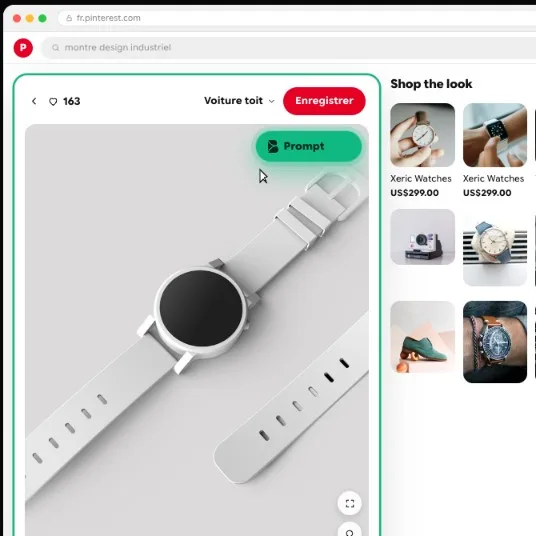
Reconstruct Modern industrial wristwatch with rectangular rounded case and slotted strap, with grid dial, paperclip hand and bright orange crown, in the environment Minimalist high-key studio background; compose Centered vertical composition, straight-on eye-level view.
- watch
- industrial design
- minimalist
- studio
Real extension output, as shown in the documentation.
Three ways to start an analysis
The Prompt button
It appears when you hover images on Pinterest, Behance, Unsplash, Dribbble and some twenty stock image sites.
The Beemm Vision menu
Right-click any image on a page, then choose Beemm Vision.
Area capture
For part of the screen: a background image, a paused video. Ctrl + Shift + C on Windows.
More than a description generator
Online “image to prompt” tools make you download the image, then upload it. The extension works where the image already is.
A typical online tool
- Download the image, then upload it
- A description, no palette
- Copy, open another tool, paste
The Beemm Vision extension
- One click on the image, where it is
- Prompt, shot details and a hex palette
- Sent straight to Generate, with the whole model catalogue
From the image to your own visual
- 01Check before you runThe image preview, the analysis model and its cost are shown. Nothing is sent until you start the analysis.
- 02Review the resultThe prompt, then the Details and Palette tabs: hex colours, the role and share of each tone.
- 03GenerateTo Beemm Vision opens Generate with the prompt already imported. Pick the model, then run it.
What the extension does not do
No tracking
It only reads the image or area you point at, never your browsing.
Local history
Your last 20 analyses stay on this computer. Nothing is synced to the cloud.
Nothing without you
No analysis without your click, and the cost is shown first.
Frequently asked questions
- How do I find the prompt of an image?
- Install the Beemm Vision Chrome extension, hover the image and click Prompt, or right-click the image and choose Beemm Vision. A vision model describes the subject, style, light and framing in a prompt ready to paste.
- What is reverse prompting?
- Recovering, from an image, a prompt able to produce a close result. The prompt you get is not the author’s: it is a faithful description written for an image generator.
- Does the prompt work in Midjourney or ChatGPT?
- Yes, you can paste it as is into any generator. With the To Beemm Vision button, it lands straight in Beemm Vision, where you pick the model.
- Is the extension free?
- Installing it is free. Each analysis uses credits from your Beemm Vision account; the cost depends on the analysis model you choose and is shown before you run it.
- Do I need a Beemm Vision account?
- Yes. The extension signs in with Google, with the same account as the app, and the account email must be verified.
Your next reference is already on screen
Install the extension from its official Chrome Web Store listing, sign in with your app account, then hover an image.